Improving First Byte and Contentful Paint on a Django Website
2026-05-11
Recently I have been experimenting with http streaming and realized how it can improve page performance. If you come from the PHP world, you might know the command flush(). It immediately sends to the visitor what has been echoed to the buffer, and doesn't wait for the full page to be rendered on the server side. That allows the browser to start rendering the website before the whole document is rendered on the server and transferred. On the other hand, the usual Django HttpResponse renders the whole HTML document on the server first, and only then sends it to the visitor. So the initial HTML document rendering is always the bottleneck for the full page load. Here comes StreamingHttpResponse, which can be used to mimic what flush() does in PHP.
HttpResponse vs. StreamingHttpResponse in Action
When using a normal HttpResponse, the HTML document is first rendered on the server side, then sent to the browser, then static files are downloaded in parallel if possible, and lastly rendering in the browser happens.
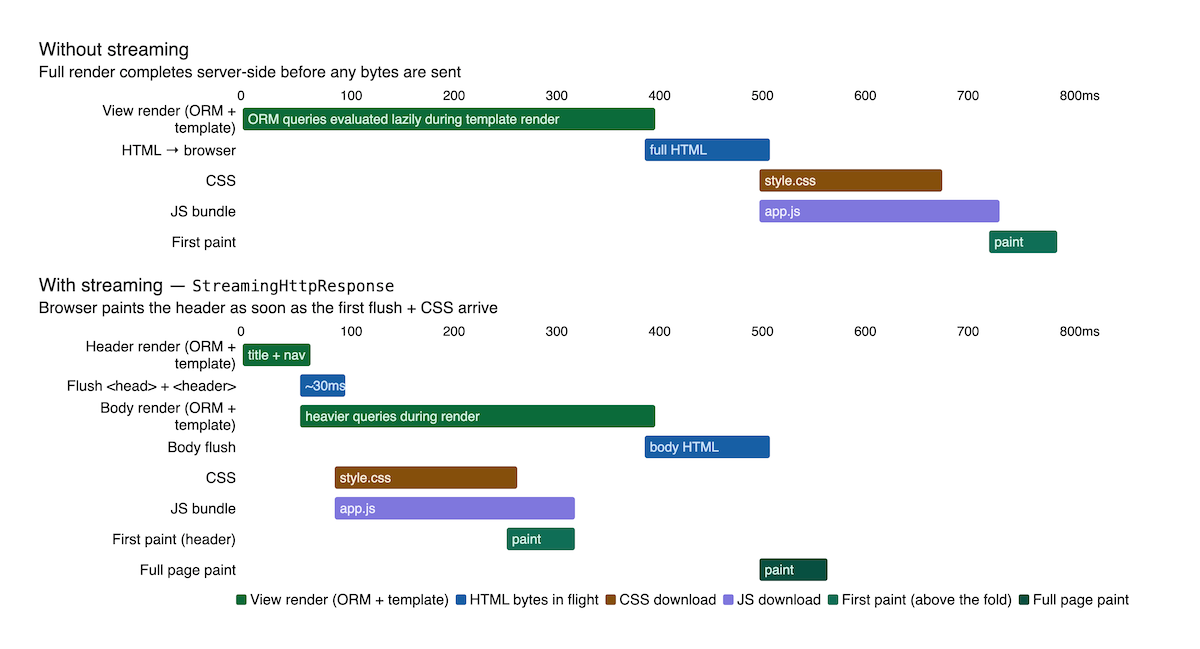
When you use StreamingHttpResponse, you can send the <head> and the content above the fold as the first part of the document, so that static files can be located and start downloading while the rest of the HTML document is being sent in parts. The first paint of the document would happen just after the CSS file is downloaded, and the rest of the HTML document would be drawn at a later point.
Generic HTML Streaming View
Here is a generic HTMLStreamingView that expects a list of template files, get_document_context_data() for the global context, and get_template_context_data() for the template-specific context:
from django.http.response import StreamingHttpResponse
from django.conf import settings
from django.template.loader import render_to_string
from django.views.generic.base import View


class HTMLStreamingView(View):
    # templates for different parts of the document
    template_names = []
    extra_context = None

    def get(self, request, *args, **kwargs):
        # Capture the nonce before StreamingHttpResponse is returned.
        # CSP middleware writes the nonce into the response header during
        # process_response, then replaces request.csp_nonce with
        # an error-raising lazy object. generate() restores the plain value
        # so templates can access it during streaming.
        self._csp_nonce = (
            str(request.csp_nonce)
            if hasattr(request, "csp_nonce")
            else None
        )
        context = self.get_document_context_data(**kwargs)
        return StreamingHttpResponse(
            self.generate(context),
            content_type="text/html"
        )

    def generate(self, context):
        if self._csp_nonce is not None:
            self.request.csp_nonce = self._csp_nonce
        for template_name in self.template_names:
            template_context = {
                **context,
                **self.get_template_context_data(template_name)
            }
            yield render_to_string(
                template_name,
                template_context,
                request=self.request
            )

    def get_document_context_data(self, **kwargs):
        kwargs.setdefault("view", self)
        if self.extra_context is not None:
            kwargs.update(self.extra_context)
        return kwargs

    def get_template_context_data(self, template_name, **kwargs):
        return {}
Use Case with the Strategic Prioritizer "1st things 1st"
The start page of the decision support system and strategic prioritizer 1st things 1st has been implemented as a multi-section landing page. The cookie consent widget only showed up after the whole page had rendered, resulting in a delay of a few seconds.
This is how I used HTMLStreamingView to reorganize the page into parts:
class StartPageView(HTMLStreamingView):
    template_names = [
        "startpage_index_top.html",
        "startpage/includes/description.html",
        "startpage/includes/tutorial.html",
        "startpage/includes/benefits.html",
        "startpage/includes/social_proof.html",
        "startpage/includes/testimonials.html",
        "startpage/includes/about_us.html",
        "startpage/includes/questions_and_answers.html",
        "startpage/includes/pricing.html",
        "startpage/includes/cause.html",
        "startpage/includes/call_to_action.html",
        "startpage/includes/footer.html",
        "startpage_index_bottom.html",
    ]

    def get_template_context_data(self, template_name, *args, **kwargs):
        if template_name == "startpage_index_top.html":
            return {
                "structured_data": settings.JSON_LD_STRUCTURED_DATA,
            }
        if template_name == "startpage/includes/social_proof.html":
            from django.contrib.auth import get_user_model

            User = get_user_model()
            return {
                "active_user_count": User.objects.filter(is_active=True).count(),
            }
        ...

        return super().get_template_context_data(template_name, **kwargs)
To transform a normal Django view into an HTTP streaming view, I cut the base.html template into two pieces:
- everything before
{% block content %}asbase_top.html— the head and content above the fold. - everything after
{% endblock content %}asbase_bottom.html— the closing HTML tags and the footer.
For example, here's base_top.html:
<!DOCTYPE html>
{% load static %}
<html lang="en">
<head>
    <meta charset="utf-8" />
    <title>{% block title %}1st things 1st{% endblock %}</title>
    <meta name="viewport" content="width=device-width, initial-scale=1" />
    <link rel="stylesheet" href="{% static 'css/styles.css' %}" />
    {% block extra_head %}{% endblock %}
</head>
<body>
    {% block top_navigation %}
        <nav>
            <a href="/">Logo</a>
        </nav>
    {% endblock %}
    <main id="main_content">
    {% block content %}{% endblock %}
    {% include "startpage/includes/extra_js.html" %}
And here is base_bottom.html:
    {% block content %}{% endblock %}
    </main>
    <footer>
        ...
    </footer>
</body>
</html>
I moved the JS from base_bottom.html to the body section of base_top.html, where it will start downloading immediately after the content above the fold is shown. I did that to reduce the delay for the cookie consent widget.
Then I prepared the templates for all parts of the start page:
startpage_index_top.htmlextendsbase_top.html- content templates provide the HTML directly without extending anything.
startpage_index_bottom.htmlextendsbase_bottom.html.
The Optimization Results
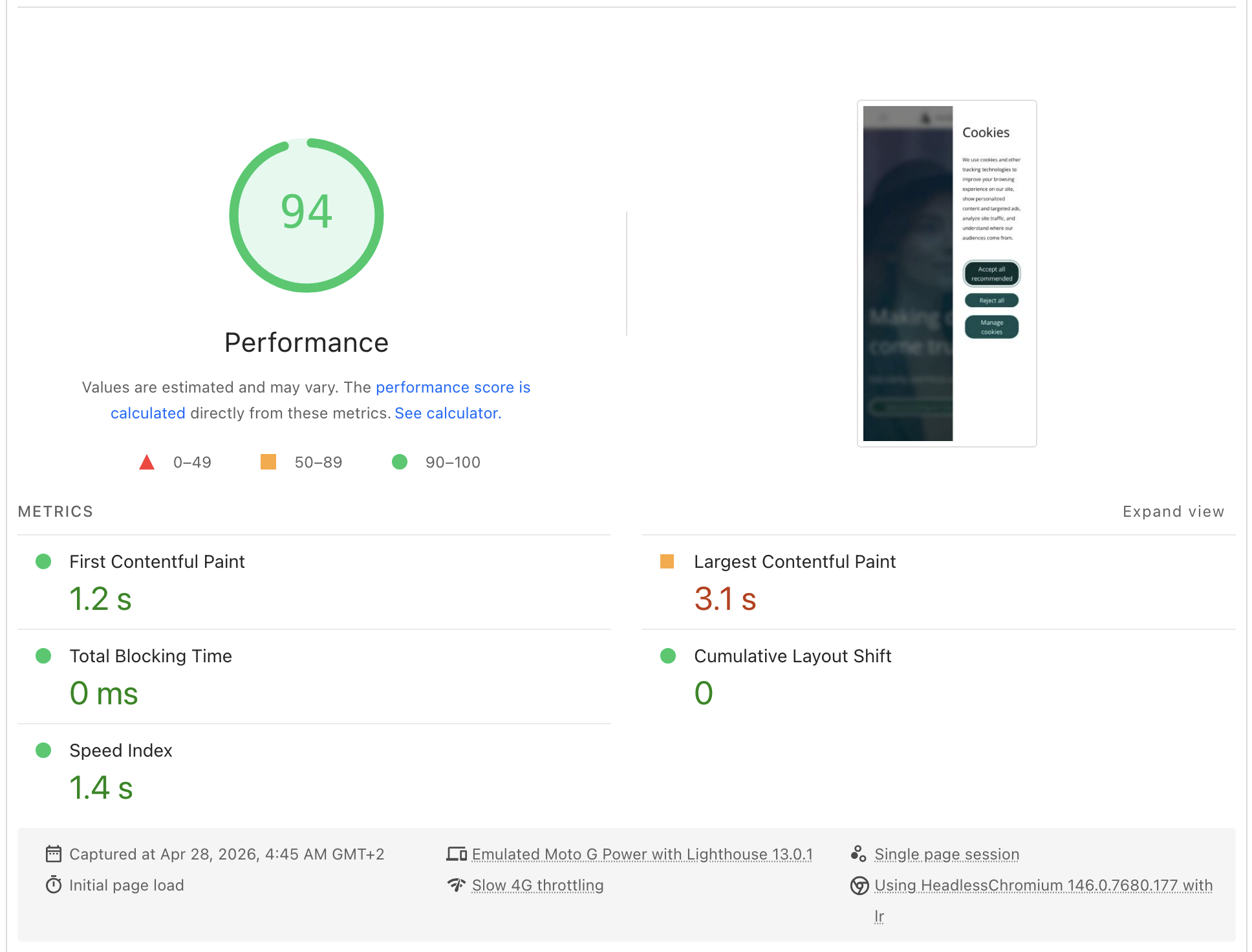
I used the Lighthouse plugin to measure performance for the start page on an emulated slow mobile network, before and after applying StreamingHttpResponse.
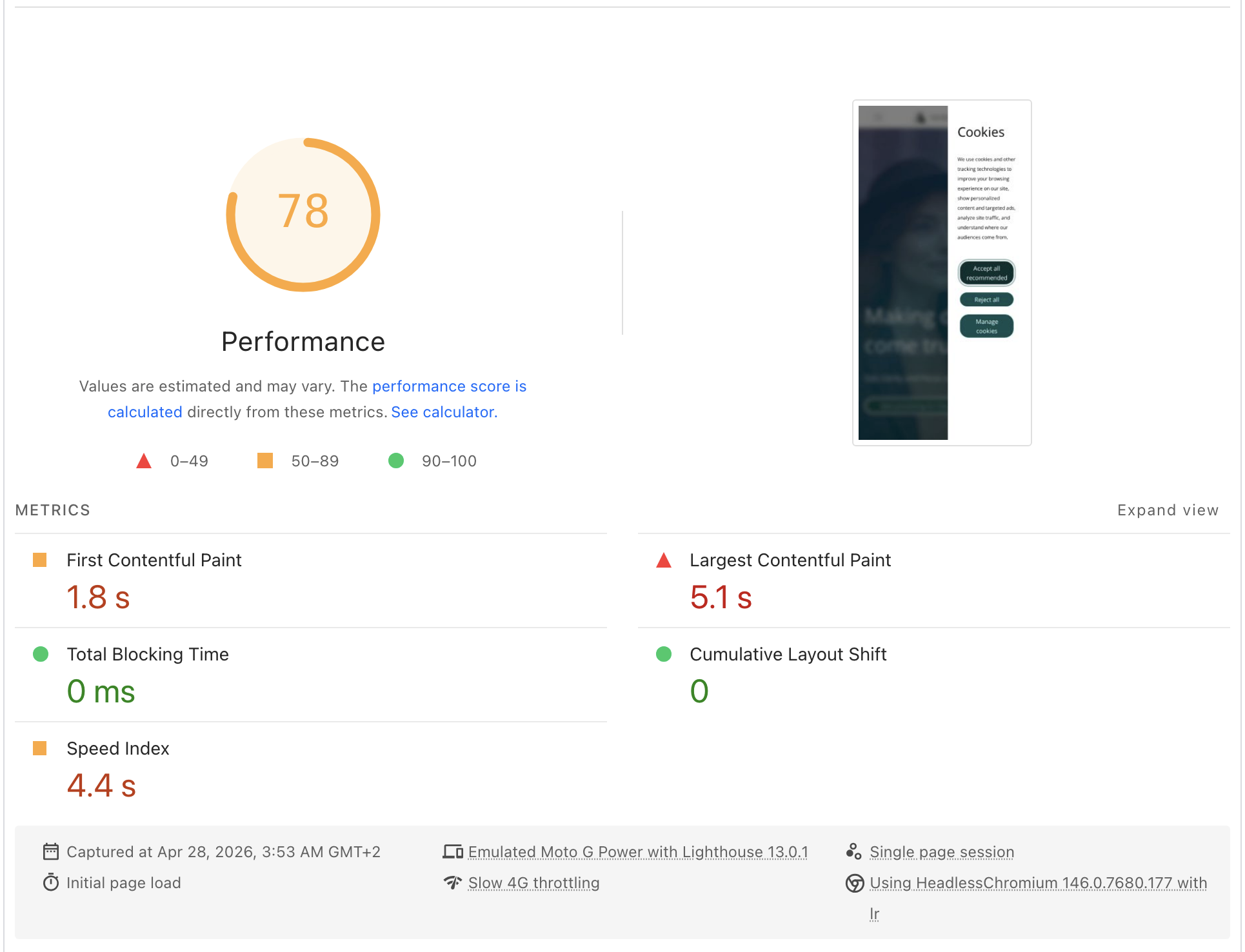
In the updated version, the content above the fold and the static files needed to render it are retrieved earlier. These include the static file requirements for the cookie consent widget, which can now be loaded from the initial part of the stream, so the widget appears sooner.
Final Words
HTTP streaming is a relatively simple technique that can make a noticeable difference in perceived page performance, particularly when it comes to metrics like First Byte and Contentful Paint. By sending the top of the document early, the browser can begin fetching static assets and rendering above-the-fold content while the server is still working on the rest of the page.
A faster Time To First Byte (TTFB) is also worth considering for LLM crawlers such as GPTBot or ClaudeBot. These bots often work with short timeouts, and if your server doesn't respond quickly enough, they may abandon the request before reading your content. HTTP streaming helps here too, since it gets the most important parts of your HTML out early — right at the top of the document where crawlers are most likely to see them.
That said, it does require splitting your templates into parts and thinking more carefully about which context data is needed where. If your page is lightweight and fast to render, the added complexity probably isn't worth it. The technique really shines on heavier pages that involve bigger database queries or external API calls — those are exactly the cases where server-side delay is most significant, and where streaming can therefore have the greatest impact.
It is also worth noting that HTTP streaming works with both WSGI and ASGI, so it fits into most standard Django deployment setups without requiring any major infrastructure changes.
Thanks to Famitsay Tamayo for the cover photo!
Also by me
Django Messaging
For Django-based social platforms.
Django Paddle Subscriptions
For Django-based SaaS projects.
Django GDPR Cookie Consent
For Django websites that use cookies.