Wagtail Routable Pages and Layout Configuration
2026-03-21
If you are familiar with Wagtail CMS for Django, you know that you can create Wagtail pages and control their content and layout with blocks inside of stream fields. But what if you have entries coming from normal Django models through a routable page? In this article, I will explore how you can control the dynamic layout of a detail view in a routable page.
Routable pages in Wagtail are dynamic pages of your CMS page tree that can have their own URL subpaths and views. You can use them for filtered list and detail views, multi-step forms, multiple formats for the same data, etc. Here I will show you a routable ArticleIndexPage with a list and detail views for Article instances rendering the detail views based on the block layout in a detail_layout stream field.
1. Project Setup
Create a Wagtail project myproject and articles app:
pip install wagtail
wagtail start myproject
cd myproject
python manage.py startapp articles
Add to INSTALLED_APPS in your Django project settings:
INSTALLED_APPS = [
    ...
    "wagtail.contrib.routable_page",  # required for RoutablePage
    "myproject.apps.articles",
]
2. File Structure
The articles app:
myproject/apps/articles/
├── __init__.py
├── apps.py
├── models.py          # Article, Category, ArticleIndexPage
├── blocks.py          # All StreamField block definitions
└── admin.py           # Register Article and Category in Django admin
The articles templates:
myproject/templates/articles/
├── article_list.html           # List view
├── article_detail.html         # Detail view
└── blocks/
    ├── cover_image_block.html
    ├── description_block.html
    └── related_articles_block.html
3. Models
myproject/apps/articles/models.py
Create the Category and Article Django models, and the ArticleIndexPage routable Wagtail page with article list and detail views:
from django.core.paginator import EmptyPage, PageNotAnInteger, Paginator
from django.db import models
from django.shortcuts import get_object_or_404
from django.utils.translation import gettext_lazy as _

from wagtail.admin.panels import FieldPanel, ObjectList, TabbedInterface
from wagtail.contrib.routable_page.models import RoutablePageMixin, path
from wagtail.fields import StreamField
from wagtail.models import Page

from .blocks import article_detail_layout_blocks


class Category(models.Model):
    name = models.CharField(max_length=100, verbose_name=_("name"))
    slug = models.SlugField(unique=True, verbose_name=_("slug"))

    class Meta:
        verbose_name = _("category")
        verbose_name_plural = _("categories")

    def __str__(self):
        return self.name


class Article(models.Model):
    title = models.CharField(max_length=255, verbose_name=_("title"))
    slug = models.SlugField(unique=True, verbose_name=_("slug"))
    category = models.ForeignKey(
        Category,
        null=True,
        blank=True,
        on_delete=models.SET_NULL,
        related_name="articles",
        verbose_name=_("category"),
    )
    cover_image = models.ForeignKey(
        "wagtailimages.Image",
        null=True,
        blank=True,
        on_delete=models.SET_NULL,
        related_name="+",
        verbose_name=_("cover image"),
    )
    description = models.TextField(blank=True, verbose_name=_("description"))
    created_at = models.DateTimeField(auto_now_add=True, verbose_name=_("created at"))

    class Meta:
        verbose_name = _("article")
        verbose_name_plural = _("articles")

    def __str__(self):
        return self.title


class ArticleIndexPage(RoutablePageMixin, Page):
    """
    A single Wagtail page that owns:
      - /articles/          → paginated list of all Articles
      - /articles/<slug>/   → detail view for one Article

    The StreamField is edited once in the Wagtail admin and
    defines the layout for every detail view.
    """

    articles_per_page = models.IntegerField(default=10, verbose_name=_("articles per page"))

    detail_layout = StreamField(
        article_detail_layout_blocks(),
        blank=True,
        use_json_field=True,
        verbose_name=_("detail layout"),
        help_text=_(
            "Configure the layout for all article detail pages. "
            "Add, remove, and reorder blocks to change what appears "
            "on every article detail view."
        ),
    )

    # TabbedInterface gives List View and Detail View their own tabs.
    # promote_panels and settings_panels must be added explicitly here
    # because edit_handler takes full ownership of the admin UI structure.
    edit_handler = TabbedInterface([
        ObjectList(Page.content_panels + [FieldPanel("articles_per_page")], heading=_("List View")),
        ObjectList([FieldPanel("detail_layout")], heading=_("Detail View")),
        ObjectList(Page.promote_panels, heading=_("SEO / Promote")),
        ObjectList(Page.settings_panels, heading=_("Settings")),
    ])

    class Meta:
        verbose_name = _("article index page")
        verbose_name_plural = _("article index pages")

    @path("")
    def article_list(self, request):
        all_articles = Article.objects.select_related("category", "cover_image").order_by("-created_at")
        paginator = Paginator(all_articles, self.articles_per_page)
        page_number = request.GET.get("page")

        try:
            articles = paginator.page(page_number)
        except PageNotAnInteger:
            articles = paginator.page(1)
        except EmptyPage:
            articles = paginator.page(paginator.num_pages)

        return self.render(
            request,
            context_overrides={"articles": articles, "paginator": paginator},
            template="articles/article_list.html",
        )

    @path("<slug:article_slug>/")
    def article_detail(self, request, article_slug):
        article = get_object_or_404(
            Article.objects.select_related("category", "cover_image"),
            slug=article_slug,
        )
        return self.render(
            request,
            context_overrides={"article": article},
            template="articles/article_detail.html",
        )
4. StreamField Blocks
myproject/apps/articles/blocks.py
Create Wagtail stream-field blocks for the cover image, description, and the related articles of an actual article. Each block can have some settings on how to represent the content of the block.
from django.utils.translation import gettext_lazy as _

from wagtail import blocks


class CoverImageBlock(blocks.StructBlock):
    aspect_ratio = blocks.ChoiceBlock(
        choices=[
            ("16-9", _("16:9 Widescreen")),
            ("4-3", _("4:3 Standard")),
            ("1-1", _("1:1 Square")),
            ("3-1", _("3:1 Banner")),
        ],
        default="16-9",
        label=_("Aspect ratio"),
        help_text=_("Controls the cropping of the cover image."),
    )

    class Meta:
        template = "articles/blocks/cover_image_block.html"
        icon = "image"
        label = _("Cover Image")


class DescriptionBlock(blocks.StructBlock):
    max_lines = blocks.IntegerBlock(
        min_value=0,
        default=0,
        label=_("Maximum lines"),
        help_text=_("Clamp the description to this many lines. Set to 0 to show all."),
        required=False,
    )

    class Meta:
        template = "articles/blocks/description_block.html"
        icon = "pilcrow"
        label = _("Description")


class RelatedArticlesBlock(blocks.StructBlock):
    sort_order = blocks.ChoiceBlock(
        choices=[
            ("newest", _("Newest first")),
            ("oldest", _("Oldest first")),
            ("title_asc", _("Title A → Z")),
            ("title_desc", _("Title Z → A")),
        ],
        default="newest",
        label=_("Sort order"),
        help_text=_("Order in which related articles are listed."),
    )

    def get_context(self, value, parent_context=None):
        context = super().get_context(value, parent_context=parent_context)
        article = (parent_context or {}).get("article")
        if not article or not article.category_id:
            context["related_articles"] = []
            return context

        from .models import Article

        sort_map = {
            "newest": "-created_at",
            "oldest": "created_at",
            "title_asc": "title",
            "title_desc": "-title",
        }

        context["related_articles"] = (
            Article.objects.select_related("category", "cover_image")
            .filter(category=article.category)
            .exclude(pk=article.pk)
            .order_by(sort_map.get(value["sort_order"], "-created_at"))[:3]
        )
        return context

    class Meta:
        template = "articles/blocks/related_articles_block.html"
        icon = "list-ul"
        label = _("Related Articles")


def article_detail_layout_blocks():
    """
    Returns the list of (name, block) tuples used in ArticleIndexPage.detail_layout.
    Defined as a function so models.py can import it without circular issues.
    """
    return [
        ("cover_image", CoverImageBlock()),
        ("description", DescriptionBlock()),
        ("related_articles", RelatedArticlesBlock()),
    ]
The RelatedArticlesBlock here also has a customized context where we pass related_articles variable with 3 other articles of the same category sorted by the sorting order defined in the block.
5. Templates
articles/article_list.html
This will be the template for the paginated article list. Later you could augment it with a search form and filters.
{% extends "base.html" %}
{% load wagtailcore_tags wagtailimages_tags i18n wagtailroutablepage_tags %}

{% block content %}
<main class="article-index">
  <h1>{{ page.title }}</h1>
  <ul class="article-list">
    {% for article in articles %}
      <li class="article-card">
        {% if article.cover_image %}{% image article.cover_image width-400 as img %}
          <img src="{{ img.url }}" alt="{{ article.title }}">
        {% endif %}
        <h2>
          <a href="{% routablepageurl page "article_detail" article.slug %}">{{ article.title }}</a>
        </h2>
        {% if article.category %}<span class="badge">{{ article.category.name }}</span>{% endif %}
        <p>{{ article.description|truncatewords:30 }}</p>
      </li>
    {% empty %}
      <li>{% trans "No articles yet." %}</li>
    {% endfor %}
  </ul>
  {% if articles.has_other_pages %}
    <nav class="pagination" aria-label="{% trans 'Article pagination' %}">
      {% if articles.has_previous %}
        <a href="?page={{ articles.previous_page_number }}">{% trans "← Previous" %}</a>
      {% endif %}
      <span>{% blocktrans with num=articles.number total=articles.paginator.num_pages %}Page {{ num }} of {{ total }}{% endblocktrans %}</span>
      {% if articles.has_next %}
        <a href="?page={{ articles.next_page_number }}">{% trans "Next →" %}</a>
      {% endif %}
    </nav>
  {% endif %}
</main>
{% endblock %}
articles/article_detail.html
The detail page would use the {% include_block page.detail_layout with article=article page=page %} to pass the article to the context of each block:
{% extends "base.html" %}
{% load i18n wagtailcore_tags wagtailroutablepage_tags %}

{% block content %}
<article class="article-detail">
  <header>
    <h1>{{ article.title }}</h1>
    {% if article.category %}<span class="badge">{{ article.category.name }}</span>{% endif %}
  </header>
  {% include_block page.detail_layout with article=article page=page %}
  <p>
    <a href="{% routablepageurl page "article_list" %}">{% trans "← Back to all articles" %}</a>
  </p>
</article>
{% endblock %}
articles/blocks/cover_image_block.html
Cover image block would show the article cover image with the aspect ratio set in the block:
{% load wagtailimages_tags %}

{% if article.cover_image %}
  <div class="cover-image cover-image--{{ value.aspect_ratio }}">
    {% image article.cover_image width-1200 as img %}
    <img src="{{ img.url }}" alt="{{ article.title }}">
  </div>
{% endif %}
articles/blocks/description_block.html
Description block would hide the article description text overflow based on the max lines set in the block:
<section class="article-description">
  <p{% if value.max_lines > 0 %} class="line-clamp" style="-webkit-line-clamp: {{ value.max_lines }};"{% endif %}>
    {{ article.description }}
  </p>
</section>
articles/blocks/related_articles_block.html
The related articles block would list the related articles as defined in the extra context of the block:
{% load i18n wagtailimages_tags wagtailroutablepage_tags %}

{% if related_articles %}
  <section class="related-articles">
    <h2>{% trans "Related Articles" %}</h2>
    <ul class="related-articles__list">
      {% for rel in related_articles %}
        <li class="related-card">
          {% if rel.cover_image %}{% image rel.cover_image width-400 as img %}
            <img src="{{ img.url }}" alt="{{ rel.title }}">
          {% endif %}
          <div class="related-card__body">
            {% if rel.category %}<span class="badge">{{ rel.category.name }}</span>{% endif %}
            <h3>
              <a href="{% routablepageurl page "article_detail" rel.slug %}">{{ rel.title }}</a>
            </h3>
            <p>{{ rel.description|truncatewords:20 }}</p>
          </div>
        </li>
      {% endfor %}
    </ul>
  </section>
{% endif %}
6. Django Admin Registration
articles/admin.py
Let's not forget to register admin views for the categories and articles so that we can add some data there:
from django.contrib import admin
from .models import Article, Category


@admin.register(Category)
class CategoryAdmin(admin.ModelAdmin):
    list_display = ("name", "slug")
    prepopulated_fields = {"slug": ("name",)}


@admin.register(Article)
class ArticleAdmin(admin.ModelAdmin):
    list_display = ("title", "category", "created_at")
    list_filter = ("category",)
    search_fields = ("title", "description")
    prepopulated_fields = {"slug": ("title",)}
7. Migrations and Initial Data
python manage.py makemigrations articles
python manage.py migrate
python manage.py createsuperuser
python manage.py runserver
8. Wagtail Admin Setup
- Open
http://localhost:8000/cms/and log in. - In the Pages explorer, create an Article Index Page as a child of the root page.
- Set the Slug to
articles.
- Set the Slug to
- On the List View tab, set Articles per page (e.g.
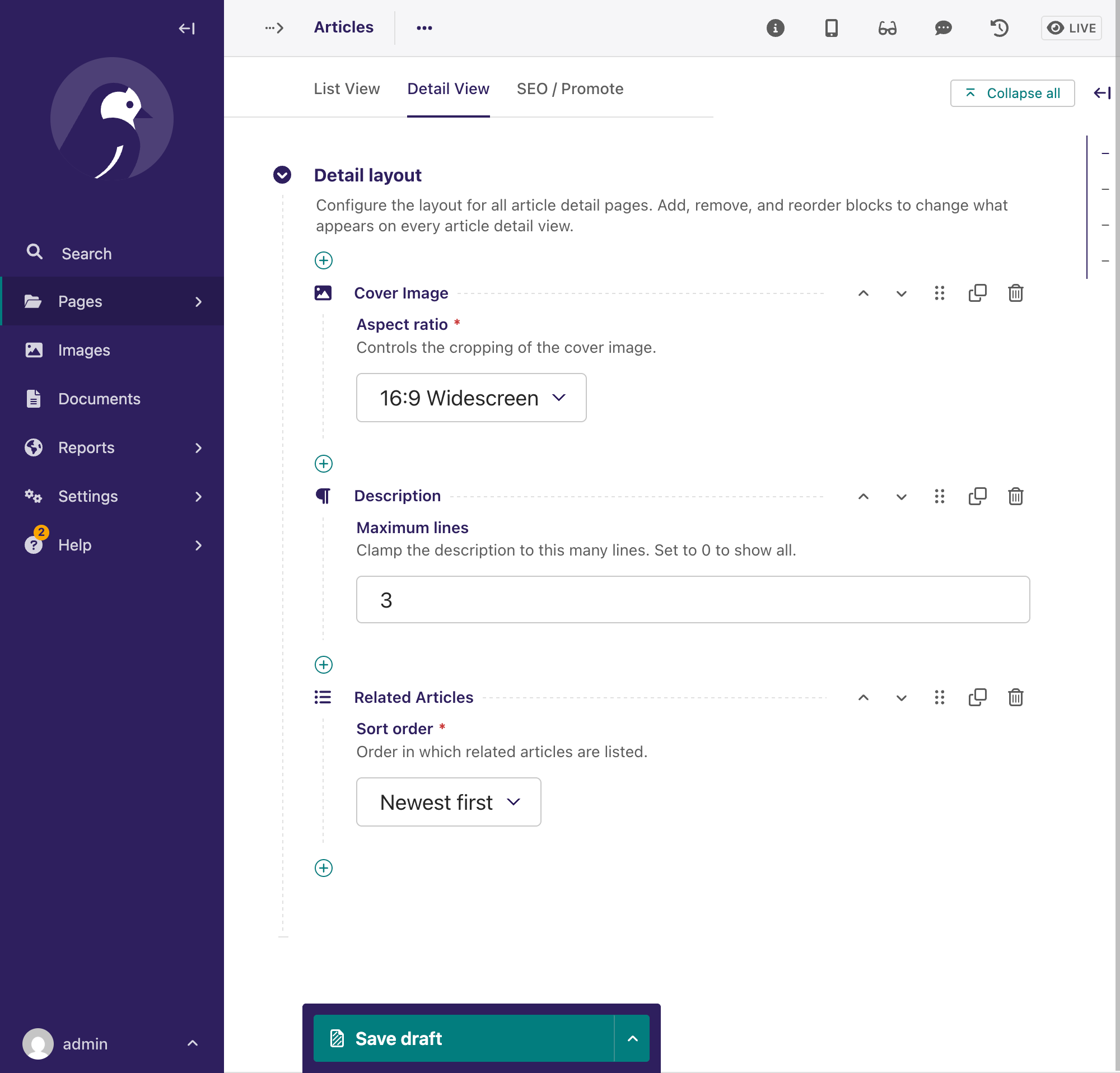
24). - On the Detail View tab, open the Detail Layout StreamField and add blocks in your preferred order:
- Cover Image — choose an aspect ratio.
- Description — optionally set a maximum line count to clamp long descriptions.
- Related Articles — choose the sort order for the three related articles shown.
- Publish the page.
- In the Django admin (
/django-admin/), create some Categories and Articles with cover images and descriptions. - Visit
http://localhost:8000/articles/for the paginated list. - Click any article to see the detail view rendered using the StreamField layout you configured in step 4.
Final words
Using stream fields we can render not only editorial content, for example, images or rich-text descriptions, but also dynamic content based on values from other models and/or the context of the given template.
The approach illustrated in this article allows us to create Wagtail pages where content editors have freedom to adjust the layouts of the pages or insert blocks, such as ads or info texts, into specific places based on real-time events.
Also by me
Django Messaging
For Django-based social platforms.
Django Paddle Subscriptions
For Django-based SaaS projects.
Django GDPR Cookie Consent
For Django websites that use cookies.